The Best CS2 Crosshair Guide: Perfecting Your Aim
Welcome back once again to Chicks Gold's in-depth blog series! This week, we're taking a look at Counter-Strike 2 and one of the in-game features that every player should have in their repertoire. Some of you may have some understanding of this tool, while others may just be wondering how to use crosshair in CS2 altogether; fortunately for our readers, we're here to see you to success! If you're a newcomer to the game, why not first check out our CS2 Beginner's Guide and get up to date with the game's mechanics? Now, let's get into the finer details!
What is a CS2 Crosshair?
The first thing we will discuss in our CS2 crosshair guide is what a crosshair is and does. A crosshair is a circular range, tropically appearing as a telescopic sight used in aiming weapons. Using a crosshair is a method that lines up your aim nades, align headshots, and control spray bursts. So, it's safe to say they're an essential part of your in-game skill library. The game's default setting is a green dynamic crosshair, which, while that may work for some, is far from ideal for others, which is why we're here to show you the best CS2 crosshairs, allowing you to make the right choice for you!
Perhaps you prefer a more subtle approach, like the use of a static crosshair. Using one of these offers a less distracting visual while still allowing it to stand out from the background so you don't lose sight of it. There are countless choices when it comes to crosshairs; players could spend many hours simply playing around with the available options to find their perfect fit. This is fine for some, but why not cut out the tedious selection process and trust Chicks Gold's Best CS2 crosshair guide? We'll first explore the settings used to give you the best chance of securing those wins.

Best CS2 Crosshair Settings
Before we dive into the technical side of the settings discussion in our CS2 crosshair guide, there are a few important factors to consider. You need to make your CS2 crosshair sizing suit your liking; at the end of the day, it will be you who is using it to literally call the shots. You don't want to strain your eyes to locate it, but neither do you want to have it covering half of your screen.
You must also consider your position in the game; AWPers may want to consider a thin crosshair due to the distance of their shots, while those taking the spray approach should consider a slightly bulkier crosshair.
Color selection also matters greatly. However, that does not mean a particular color is objectively better than others; rather, the color matters to the individual player. Select something you feel is noticeable yet discrete; you don't want a huge red marker taking up your screen, nor do you want a brown pinpoint blending into the wall behind opponents. So, take some time to play around with color selection until you find what is right for you. Now, let's get onto the settings themself.
Below, we have compiled a list of the best crosshair settings to use based on popularity in-game:
- Crosshair Style: Classic Static
- Friendly Fire Reticle Warning: Off
- Follow Recoil: No
- Center Dot: No
- Length: 1.6
- Thickness: 0.7
- Gap: -2.6
- Outline: 1.0
- Red: 0
- Green: 255
- Blue: 0
- Alpha: On, 255
- T-Style: No
- Deployed Weapon Gap: No
- Show Play Crosshairs: At Player Discretion
Types of Crosshair in CS2
Within the game, there are three primary crosshairs. Below, we have broken them down for you to make a more informed decision when creating your perfect CS2 crosshair:
Static Crosshairs: This is a consistent crosshair, remaining the same throughout all gameplay.
Dynamic Crosshairs: This form of crosshair offers the player feedback as they adapt to the game's mechanics. It will also respond to actions and movements made by the players, expanding and contracting where necessary.
Hybrid Crosshairs: Present a combination of both the dynamic and static crosshair elements for an all-round feel.
Overall, there are six crosshair styles, Style 0-5. However, the most commonly used among professional players and streamers is style 4, as it provides an excellent balance of visibility and accuracy. This does not mean that that will necessarily be the style for you. We always recommend playing around with settings before you dive into the action to ensure you've found the perfect fit for you. Some excellent training maps are mentioned in our guide linked above, and if that's not your style, you can try the newly reworked Deathmatch. New targets in bigger batches are now available for you to get in some good practice.
CS2 Crosshair Guide: Best Codes Used by Pro Players
There is an abundant fanbase for CS2, meaning there are sure to be a variety of options when it comes to in-game skills and tools, such as crosshairs. So, below, we have compiled a list of the most popular Crosshairs used by some of the most renowned streamers and players:
- Nicolai ‘dev1ce’ Reedtz: CSGO-yxFut-M6Vka-p4GAf-X5yZT-ey3JE
- Denis ‘deko’ Zhukov: CSGO-9GVqi-ixpNa-JuGa8-ae6hd-H7xDK
- Ilya ‘m0NESY’ Osipov: CSGO-hzrMn-jXu8b-R7VH4-hQ9aa-OnMHA
- Gabriel ‘FalleN’ Toledo: CSGO-TpORA-p9Ley-TLQ3P-HzXJY-U9z6A
- Jacky ‘Stewie2K’ Yip: CSGO-QVV9H-dfdPZ-G97WJ-E3SxF-tHwzF
- Aleksi ‘Aleksib’ Virolainen: CSGO-Jp4hk-AfzML-FcpUT-2pfxZ-kSLoD
- Owen 'smooya' Butterfield: CSGO-i2z3i-7o4Qx-u7R8Z-oMHCb-tOUnB
- Abdul ‘degster’ Gasanov: CSGO-i6W7e-7dNbB-7u2hV-vwvQd-97DRE
- Marcelo ‘coldzera’ David: CSGO-3Ppuw-omUQp-VYbMN-CKMnA-frPcF
- Håvard ‘rain’ Nygaard: CSGO-mbppN-WGdqq-XeBH8-bmdyV-fxwPB
- Finn ‘karrigan’ Andersen: CSGO-CP44i-z2D7K-dpJhE-TvPaj-MaMbM
- Helvijs ‘broky’ Saukants: CSGO-2uABj-Rr3dC-yhVt3-bXe8v-tDu8O
As is visible by the sheer variety among just these select few players, CS2 Crosshairs are truly unique to the player, and what works for one will not work for all; so always keep in mind the time you'll need to spend tweaking settings, color selection and more.
How Do I Import the Best Crosshair Codes in CS2?
When it comes time to test out the Crosshairs in CS2, you'll likely need to import some codes to take them for a test drive. So, let's take a look at how to go about that:
- Firstly, click the gear option at the top left corner of your screen to access the settings menu.
- You'll see a 'Play' button; beneath that, press 'Game' and then 'Crosshair' to uncover your option.
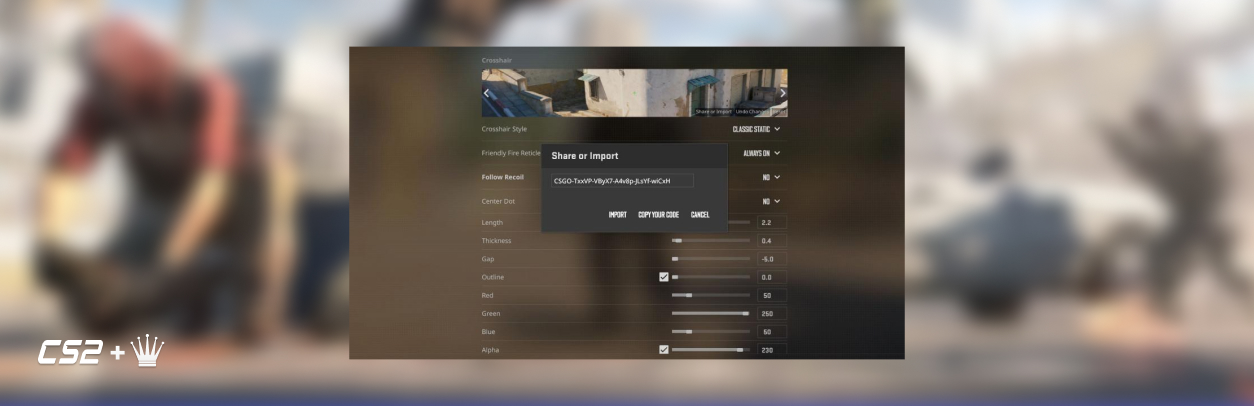
- Then, when in the Crosshair preview, select 'Share of Import.'
- From there, select, copy, and paste the code you wish to use and 'import' it; there you have it, ready to go.
Is Something Missing from the Crosshairs in CS2?
If you've been a long-time fan since the CS: GO days, you've likely noticed that Crosshairs look somewhat different now. This is due to the options for Crosshairs being whittled down in comparison to the previous game version. It's yet to be announced by Valve whether the missing options will make a reappearance or the gap will be filled; however, given the inclusion of some of the previous games aspects in the short time since its release, we're likely to see them at some point in the future.
Until then, buckle up and get ready for a few rounds of testing until you're able to find the CS2 Crosshair cod that works for you.

CS2 Crosshair Guide: FAQ
To ensure we leave no stone unturned, we have compiled a list of the frequently asked questions regarding Crosshairs in CS2. Take a look below to have your burning questions answered:
How Do I Change My Crosshair Profile?
Head to your settings, select the 'Crosshair' tab, and then click the 'Primary' option; there, you will be able to view all of the customizable options.
What Height Should My Crosshair Be?
Always aim to have it around 'eye level'; having it at this height means you will automatically be at a steady height for shots rather than having to adjust your positioning. This will save you time and, with any luck, boost your kills.
CS2 Crosshair Guide: Conclusion
In reality, there is no perfect CS2 crosshair, only the one that is perfect for you. So, take a step back, a few deep breaths, and then dive into the options presented. It may take a while, but it will be well worth it once you have your aim perfected, and your team will thank you for the wins that start to roll in! If you're having difficulty mastering anything in the game, why not check out Chicks Gold's services? We have excellent CS2 skins, items, currency, and even accounts; don't get stuck in a rut; find your solution with us!
Thank you to our readers for trusting our CS2 crosshair guide; we will be back next week with another exciting installment in the blog series, so keep your eyes peeled for the latest and greatest in the gaming scene; we'll see you soon.

Helen is a gaming blogger with a talent for dissecting complex gameplay. Her insightful analysis and vivid writing style place readers right in the heart of the games she passionately explores.

December 27, 2024
Read post
November 8, 2024
Read post
June 25, 2024
Read post
May 24, 2024
Read post